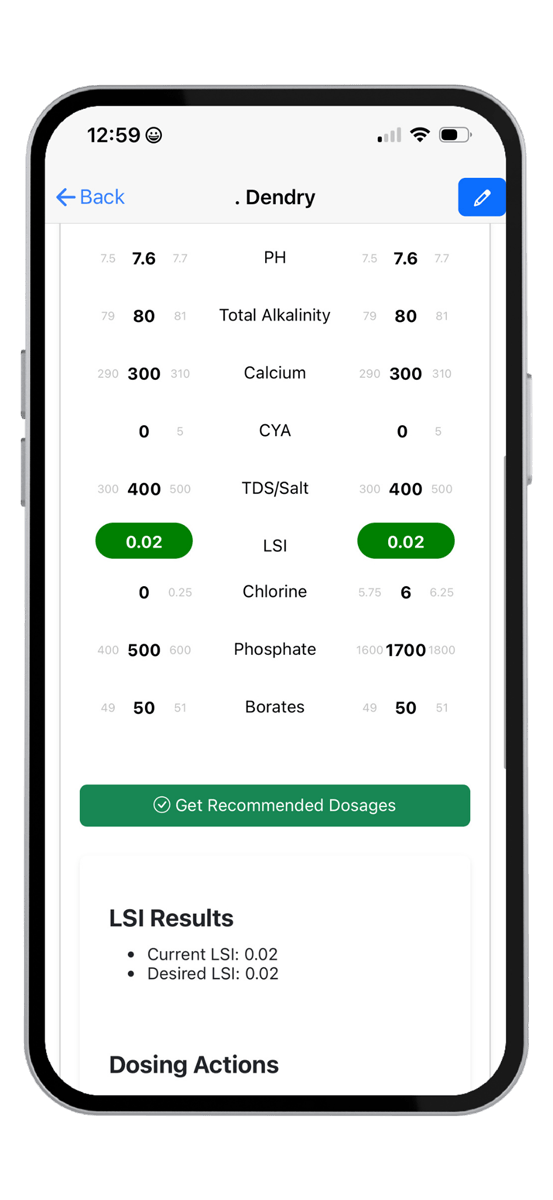



Managing pool chemistry just got easier. We’ve partnered with HASA to integrate Orenda’s trusted chemical calculator directly into Skedit, giving you powerful new tools to track and manage water chemistry for every pool you service.
What makes this different from the standalone Orenda app? This integration stores pool volume per customer and maintains a complete historical record of LSI and chemical levels for every pool. Each service visit adds to this history, creating a detailed record tied directly to the job and customer.
Getting Started with Chemical Tracking
Setting up chemical tracking is straightforward:
- Reach out to your Skedit rep to activate Pool Chemical Tracking
- Navigate to any job and click the new Orenda tab
- Select Add Structure and input the pool volume—this saves automatically to the customer profile
- Enter current chemical readings and click Get Recommended Dosages
- Review the calculated adjustments needed to achieve balanced LSI
- Access the complete history of past calculations and adjustments in the section below
Beyond making your chemical balancing more accurate, this feature provides transparency that customers appreciate. They can see exactly what work your team performs at each visit, building trust and demonstrating your expertise.
What’s on the Horizon
We’re not stopping here. The Equipment Tracker is coming soon, expanding on this foundation by letting you document pumps, filters, heaters, and other equipment for each pool at every job site.